One platform for your GSM service

With UT Tool Pro v2, perform FRP bypass, IMEI repair, virus removal, and flash on Samsung, Xiaomi, Huawei, MTK, Qualcomm, and Unisoc devices. Same license for customer, device, and dealer tracking via the web panel.

One license valid for both Pro v2 and legacy version · Download: Files
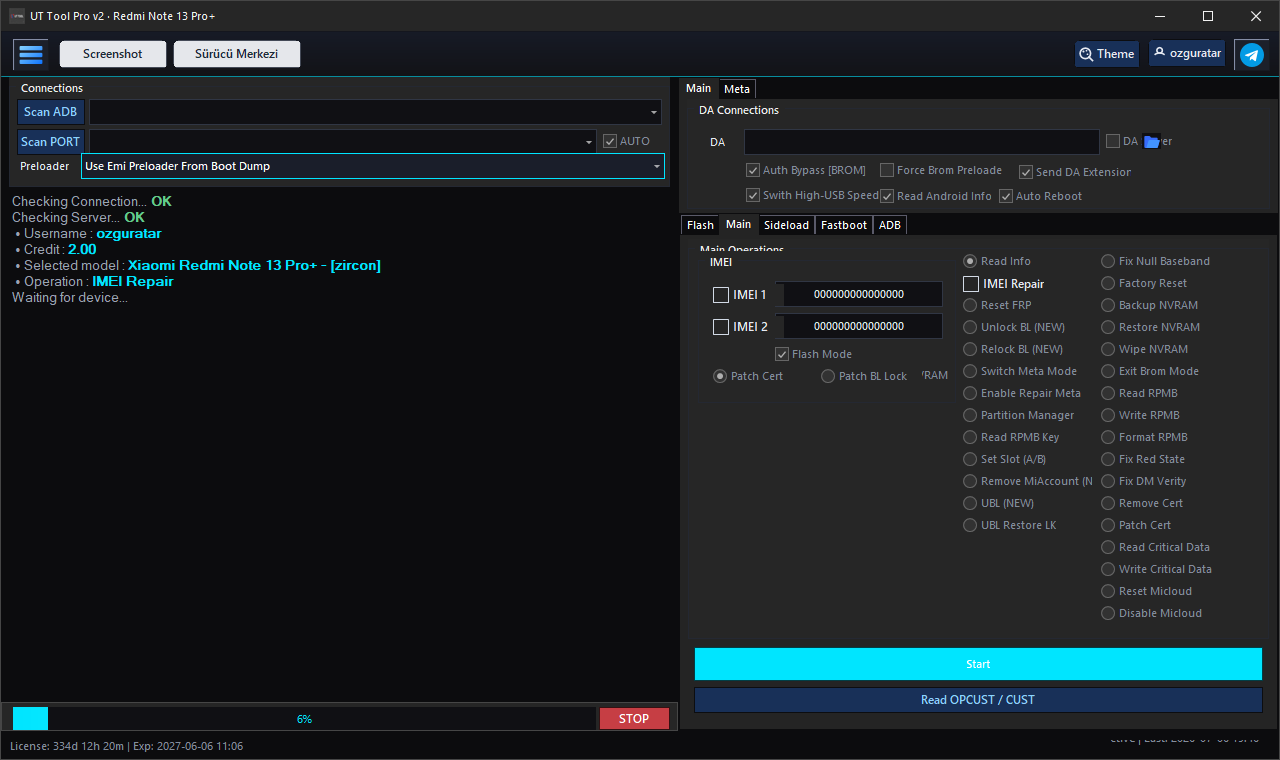
UT Tool Pro v2 interface — IMEI Repair, UBL NEW, Unlock BL, FRP operations
UT Tool Pro v2 · Redmi Note 13 Pro+ · UBL · IMEI · FRP

85K+

Successful Operations

12K+

Registered Devices

%100

Customer Satisfaction

7/24

Server Online

Software

Which version should I download?

UT Tool Pro v2 is recommended for new users. Existing UnlockTurkey Tool users can continue with the same account.

Legacy version

UnlockTurkey Tool

v2.0.x series · Maintenance mode

Classic UnlockTurkey interface. Archive versions for existing users on the files page. New licenses use Pro v2; same username and password apply.

  • Familiar interface (v2.0.9 and earlier)
  • Same license account
  • Archive versions available
  • New features only in Pro v2
Legacy Versions

Web panel — included with tool

Your license covers both the desktop tool and web panel. Customer tracking, device registration, service status, and dealer management in one place.

Customers & accounts Device tracking Dealer panel Service lookup File archive
Tool Features

All operations — Q&A

Modules and operations in UT Tool Pro v2. Credit status may vary by model.

UBL & Bootloader (NEW)
What is UBL (NEW)? Which devices does it support?NEW
UBL (Unlock Bootloader — NEW) unlocks the bootloader on MediaTek devices by patching the LK (Little Kernel) partition with a native patcher. The tool reads lk_a, applies selected pins, writes lk_a + lk_b, and reboots. Supported on Exynos / MTK service models — check the model list.
What does UBL Restore LK do?
Restores a previously saved LK backup. An automatic backup is taken before UBL; if something goes wrong, use UBL Restore LK to write the original LK file to the lk_a / lk_b partitions.
What is the difference between Unlock BL (NEW) and Relock BL (NEW)?
Unlock BL (NEW) — unlocks the bootloader with the latest MTK exploit chain. Relock BL (NEW) — locks it again. Both depend on model and security state; reading device info before the operation is recommended.
What is Temp UBL (Qualcomm / Xiaomi)?0 Credit
Temporary bootloader unlock on Qualcomm-based Xiaomi devices. Supported codenames: amethyst, aurora, chenfeng, dada, fuxi, garnet, houji, ishtar, marble, mondrian, nuwa, onyx, peridot, ruyi, socrates, vermeer, zorn, xuanyuan, and others. Not permanent — the lock may return after reboot.
How do I unlock / relock the bootloader (general)?
In Fastboot or BROM/Preloader mode, select the model and start Unlock Bootloader or Relock Bootloader. Supported on MTK, Qualcomm, and some Unisoc models.
FRP & Account Removal
How does Reset FRP work?0 Credit
Removes Google FRP lock. Model-specific methods on Samsung (*#0*# test menu), Xiaomi, Oppo, Realme, Huawei, and MTK/QC/SPD devices. Connection via ADB, Fastboot, BROM, or Download mode may be required.
Mi Account / Micloud removal?
Remove MiAccount, Reset Micloud, and Disable Micloud clear account locks on Xiaomi / Redmi / POCO models. Some models may require UBL or Auth.
Is Samsung FRP supported on all models?
Yes — ADB, MTP, and Download (Odin) modes are supported. Fast bypass on models with ADB enabled via *#0*# test menu. KG / Knox status can be read from within the tool.
How is Huawei ID reset done?
ID reset on Huawei / Honor devices via test point or USB mode connection. Chipset and method are selected automatically from the model catalog.
IMEI & Network
How is IMEI Repair performed?
On supported models, new values are written to IMEI 1 and IMEI 2 fields. Uses MTK Meta mode, Qualcomm diag, or model-specific methods. NVRAM/QCN backup before the operation is recommended.
QCN backup and restore?
Backs up and restores network data (QCN) on Qualcomm devices. Always back up before IMEI repair or EFS operations.
Fix Null Baseband / Fix Red State / Fix DM Verity?
Null Baseband — network loss repair. Red State — warning fix after custom ROM. DM Verity — verity error fix. Applied based on model and partition state.
Cert file read / write / remove?
Read Cert, Write Cert, Remove Cert, Patch Cert — certificate management on Samsung and other models. Used for IMEI and network issues.
When is EFS reset needed?
EFS partition is reset for network errors, corrupted NV, or IMEI issues. The operation cannot be undone — back up QCN/NVRAM first.
Flash, Auth & Exploit
What is Auth Flash (Xiaomi)?0 Credit
Starts flash operations requiring Mi Auth on Xiaomi Qualcomm devices via the tool's Auth flow. Works in EDL mode; auth profile is selected automatically from the model catalog.
What does Auth Bypass [BROM] do?
DA (Download Agent) auth bypass in MediaTek BROM mode. Security is bypassed with Kamakiri, Carbonara, and All-in-One exploit chain; flash and format operations are possible.
MTK Flash / Format / Partition Manager?
Read, write, format with scatter or dynamic partition list. Individual partition selection with Partition Manager. RPMB read/write/format supported.
Qualcomm EDL flash and cloud loader?
Flash in 9008 EDL mode with firehose loader. Cloud loader catalog matches automatically; manual loader selection is also available. Sideload and fastboot operations in a separate tab.
Unisoc (SPD) FDL flash?
Flash Unisoc devices with model-based fdl1-sign.bin and fdl2-sign.bin. Tecno, Infinix, Realme, Itel, and Samsung SPD models in the catalog.
Is there Anti-Rollback (ARB) checking?
Yes — ARB version is checked before flash. Warnings are shown for operations with downgrade risk.
Samsung & System
Samsung Odin 4-part ROM flashing?
Flash in Download mode with AP, BL, CP, CSC files. KG (Knox Guard) status is read; CSC change and region settings supported.
Enter Download mode without buttons?
On supported Samsung models, switch to Download mode via ADB or MTP — no physical key combination required.
How does virus removal (ADB Heuristic) work?
Heuristic scan over ADB detects hidden ads and malicious apps. Cleans without touching system files; effective on stubborn malware.
NVRAM backup / restore / erase?
NVRAM partition management on MTK devices. Contains IMEI and WiFi/BT MAC data — back up before any operation.
Read Info / Meta Mode / Switch Meta Mode?
Device info reading, switch to Meta mode, and enable repair meta. Used for IMEI repair and service operations.
Web Panel & License
What can you do in the web panel?
Customer/account tracking, device registration, service lookup, file archive, dealer management, and credit operations. Same account via Panel login.
Is there HWID lock on tool login?
Yes — the license binds to the computer on first login. HWID change requires reset from the panel or a support request. No HWID lock on the web panel.
Setup

Get started in 3 steps

Get a license, download the tool, and manage service and customers from the web panel.

Download the Tool

Download UT Tool Pro v2 from the files page. Legacy UnlockTurkey Tool versions are also archived on the same page.

Log In to the Panel

Sign in with your account and manage customers and device tracking from the web panel.

Manage Devices

Connect with the tool and perform virus removal, FRP, IMEI, and more with one click.

Pricing

License Options

Choose the duration that fits your needs. All packages include UT Tool Pro v2 and web panel access.

6 Months
$20

One-time payment · 6 months full access
UT Tool Pro v2 + Web Panel

Buy via WhatsApp

Payment: USD · WhatsApp or support line · Activation usually same day

FAQ

Frequently asked questions

Short answers about Pro v2, legacy version, and licensing.

What is the difference between UT Tool Pro v2 and UnlockTurkey Tool?
Pro v2 is a fully renewed version: modern UI, secure API channel, wide model support, and active development. UnlockTurkey Tool v2.0.x is the legacy UI version; it remains available as an archive.
Does the same license work on both versions?
Yes. Your username and password work on both desktop versions. Web panel access is also tied to the same account.
Are panel login and tool login the same?
Yes, the same credentials are used. You manage customers and service tracking from the web panel; tool login additionally applies HWID verification.
Which Windows versions are supported?
Windows 10 or 11 (64-bit) is recommended for UT Tool Pro v2. Internet connection is required for license and catalog synchronization.
How do I purchase a license?
Contact via WhatsApp from the pricing section: 6 months $20 or 12+3 months (15 months) $35. Your account is usually activated the same day after payment.
Support

GSM Support Form

Submit technical, license, HWID, or payment requests — track with your ticket number.

Support channels

  • Form — response within 24 hours (you receive a ticket no.)
  • WhatsApp — urgent technical support
  • Email — business inquiries

Include in the form:

  • Tool version (Pro v2 / Legacy)
  • Device brand / model
  • Error message or log
  • Screenshot (optional)
WhatsApp Support

Create support request

Fill in all fields. For technical issues, always specify device model and operation type.

CONTACT

Contact Us

Reach us through the channels below for purchases, technical support, and dealership inquiries.